
A Documentary on the Life of China’s First Feminist

About Autumn Gem

Qiu Jin

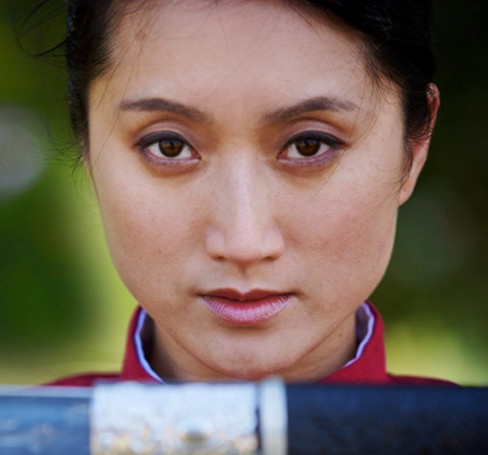
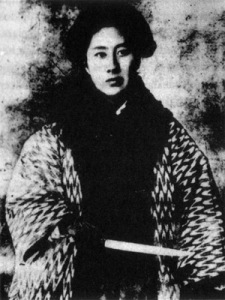
This project explores the extraordinary life of the Chinese revolutionary heroine and women’s rights activist Qiu Jin (1875 – 1907). During the reign of the last dynasty in China, Qiu Jin boldly challenged traditional gender roles and demanded equal rights and opportunities for women. At a time when women’s lives were often marked by repressive practices such as footbinding, arranged marriages, and denial of education, she envisioned a future where women would free themselves from the confines of tradition and emerge as strong and active citizens of a new and modern nation.

On this site, you can:

Or continue reading the Autumn Gem blog below!

Autumn Gem in World Journal 6/22

June 27th, 2009

Autumn Gem made it into the 6/22/2009 edition, section B2, of the World Journal again. Here’s a short article about the film and the screening in San Diego. We had another interview with a writer from the World Journal stationed in New Jersey. We’ll be screening the film at the New Jersey Chinese Community Center in Somerset, NJ, on October 17, 2009. More details to come as the date gets closer!

Click on the photo to see a larger version:

Autumn Gem in World Journal 6/22/2009

Autumn Gem in World Journal 6/22/2009

Autumn Gem in World Journal 5/28

June 27th, 2009

Catching up on the press mentions of Autumn Gem. The World Journal posted a recap from our screening in San Diego at La Jolla Country Day School. Here’s a scan of the article. Click on the picture to see a larger version.

Autumn Gem World Journal Article (2009-05-28)

Autumn Gem World Journal Article (2009-05-28)

Interview on BoomTown

June 15th, 2009

The other day, Kara Swisher from AllThingsD.com interviewed us about Autumn Gem and making documentaries in the digital age. We talk about the genesis of the film, the production schedule, and provide hints at where we see the film being distributed in the future. Check it out!

New Autumn Gem Trailer

June 14th, 2009

Here’s our revised trailer for Autumn Gem. When we first filmed the teaser trailer, we hadn’t shot any footage from the actual documentary. This version of the trailer keeps the dramatic narration but adds scenes from our filming in China and the Bay Area. Enjoy!

Click here to see it in HD or watch the YouTube version

Autumn Gem Screening at D7 Conference

May 27th, 2009

Rae and I are minutes away from the Autumn Gem screening at the D7 Conference at the Four Seasons Aviara in Carlsbad, California. We’re excited to show the film in glorious 1080p. The dual projectors produce an absolutely fabulous picture… it’s the film as it was meant to be seen!

D7 attendees all received a special DVD of the movie in their gift bag. Walt Mossberg and Kara Swisher provided a special note on the DVD jacket. Big thanks to them for allowing us to screen our film at the conference!

Here are some photos from the screening at D7:

Screening at La Jolla Country Day School

May 22nd, 2009

Screening at La Jolla Country Day School

On May 22, we held a screening at Adam’s high school, La Jolla Country Day School. It was great to meet up with former classmates, teachers, and family friends. All in all, about 200 people were present for the documentary, which was shown in the Four Flowers Theater. Back when Adam was a student at LJCDS, the Four Flowers Theater did not exist! The school has undergone quite a transformation since his graduation in the early 90s.

Here are some photos from the Country Day Screening:

Read the rest of this entry »

Autumn Gem DVD

May 11th, 2009

As we prepare for our upcoming two-week trip down to San Diego, we’ve been hard at work creating first version of the AUTUMN GEM DVD. This version contains the movie, scene selections and a support page. The Special Edition with photos and commentary will come out later.

Here’s what the DVD will look like:

autumn-gem-dvd

Up till this point, we’ve been burning one-off DVDs using the SuperDrive on our Macintosh. We weren’t going to do that for 700 DVDs, so we went with DiscMakers to handle this job. With these DVDs, we’ll be able to give a version that we’re happy with to prospective screening organizations, donors, friends, family, and cast and crew members.

Here’s a photo of the DVD jacket. For eco-purposes, we’re avoiding the jewel cases and going for a paper jacket:

autumn-gem-jacket

May Screenings in San Diego

April 20th, 2009

We’ll be screening Autumn Gem at Adam’s high school in San Diego:

May 22 at La Jolla Country Day School

There will be a reception around 6:00 pm prior to the screening at 7:00 pm. There will be a limit on the number of outside guests that can attend, so if you are interested in attending, please email Adam or Rae at info (at) autumn-gem.com.

We will also be screening the film at the D7 Conference in Carlsbad the following week, but that will be a private event that is not open to the public.

Screening at COBA

April 11th, 2009

Screening at COBA

For the past several years, I’ve been running a camera user group called COBA, or Camera Owners of the Bay Area. We meet every month to talk about the latest developments in the digital camera space and feature presentations from photography-related companies and photographers. For the April meeting, we screened AUTUMN GEM to the COBA crowd at SmugMug headquarters in Mountain View, California.

Many COBA members have known that Rae and I have been working on AUTUMN GEM for the past year and a half. It was great to finally be able to share the documentary with them! We’re currently arranging more public screenings around the Bay Area and at universities and Asian-American/Chinese Historical organizations across the country. Soon, we’ll have a section of the site devoted to finding the next screening. Stay tuned!

Read the rest of this entry »

Cast and Crew Screening Party Photos

March 11th, 2009

Adam and Rae at the Cast and Crew Screening Party

Here are some photos from Timothy Chang from the cast and crew screening party held over the weekend. Thanks to the Domain Hotel in Sunnyvale for hosting and everyone who were able to take time out of their Sundays to come out! It’s now onward and upward with marketing and business development for the film.

Read the rest of this entry »

Final Cut and Cast and Crew Party

February 27th, 2009

How time flies! It was a year ago when Rae, Rae’s parents, JP, and I travelled to China to start production on Autumn Gem. Earlier last month, we’ve completed the final cut of the film. Tomorrow afternoon, we’ll be showing it to the first time at our cast and crew screening party!

An so begins the next phase — marketing and business development — for Autumn Gem. It’s something we’re both excited and scared about at the same time. On the one hand, we’re happy that we’re able to show a finished product that we’re proud of. On the other hand, there’s the chance that people who see it will not like it! We’ve already experienced a tiny bit of rejection with some of the film festivals to whom we submitted earlier in the year. I like to focus on the positive, however, and that’s the task of showing this film to as many people as possible who are interested in learning about this important heroine from China’s history.

We’ll have photos and a recap from the event after tomorrow!

How I Learned to Hate Scrolling Credits

February 25th, 2009

One of the very last things to complete with Autumn Gem has been the final credits sequence. I’ve been struggling mightily over the past few weeks trying to get the credits to scroll properly without jerkiness or stuttering. I’ve read all of the forums and tried many of the tips and tricks people have suggested, including:

  • Deflicker filter
  • Motion blur
  • Using Motion to animate the scrolling
  • Third-party plugins
  • Calculating optimal pixels per second for 30fps and 29.97fps frame rates
  • Scrolling a giant, vertical graphic made in Photoshop instead of using Final Cut text generators

Despite my best efforts and hours of render time, the credits never scrolled properly on our MXO-powered 23-inch ADC broadcast monitor or when output to a progressive QuickTime movie. They might start out fine, but every few seconds, the screen would suddenly jerk up a few extra pixels, creating an uncomfortable stutter effect.

At this point, I’ve about given up, and that’s a good thing, because I came up with a simpler solution that looks just as good. Instead of scrolling a 10800-pixel tall Photoshop graphic over seventy-two seconds, we’re cross-dissolving eleven credit screens over that same time. This comes out to about 6 seconds per screen, which is more than enough time for our cast and crew to find themselves.

One day, I’ll figure out the magical formula to getting silky smooth scrolling credits. I’ll leave that task, however, for the next film!

Subtitles

February 17th, 2009

While we finish up the audio mixing with Matt this week, we decided to make a change to the look of our subtitles in Autumn Gem. Up until today, we’ve been using Final Cut’s standard Text generator to create our subtitles. Here’s a screenshot of what our subtitles used to look like:

autumn-gem-subtitles-yellow

This afternoon, I began switching over to using the Outline Text generator. This has a number of benefits, chief among them the ability to add a stroke around each character, which greatly improves readability. In addition, we’ve changed the font style from italic to plain, which reduce jaggies when displaying the film on lower-resolution monitors or on DVD. Here’s what our subtitles look like now:

autumn-gem-subtitles-white

I’ve been planning to make this change for many months, but I’ve been procrastinating until now, knowing that it would take me about nine hours to change every text clip in the entire film. Unfortunately, there’s no quick and easy way to batch convert from one text generator to another. I did find some shortcuts that helped speed up the process:

  1. Create an outline text generator with your default settings for font style, size, and stroke width
  2. Place the outline text on your timeline and set the duration to be exactly the length of the text you are replacing
  3. Copy the text clip that you are replacing (Command-C)
  4. Paste Attributes onto the new outline text clip (Option-V)
  5. Double-click on the original text clip
  6. Copy the text under the control tab
  7. Double-click on the new text clip
  8. Paste the new text under the control tab
  9. Repeat with the rest of your text clips

One annoying thing is that the placement controls are different between the two text generators. For instance, setting a center position of (0, 345) for an Outline Text clip does not line up in the same place as setting (0, 345) with a standard Text clip. This means I’ve had to manually position a number of text clips, a time-consuming process that I really don’t want to visit again!

So, the decision to go from straight text to outline text, while simple, requires lots of time, patience, and verification. In the end, though, it’s the right move, as our subtitles are much more readable now than before.

For those type-inclined, we used the classic font Helvetica Neue for main subtitle font. Hoefler Text was used as our serif title font, and ST Kaiti was used when displaying Chinese characters.

ADR Wrap Up

January 25th, 2009

ADR Wrap Up

We’ve completed our ADR recording yesterday at Matt’s house. Preston was the final actor to come in and record his lines. Now, Rae and I are off to make the final picture lock on the film while Matt continues his audio mixing magic. Here are some photos from the past three weeks of ADR work with our actors and actresses from Autumn Gem.

Read the rest of this entry »

Final Cut Tips for Documentary Filmmakers

January 17th, 2009

Li Jing demonstrates her form for the Women's Army

Rae and I have learned quite a bit about using Final Cut to create our documentary, Autumn Gem. Here are some tips that will save you a lot of time when putting together your film.

  1. Backup regularly
  2. Run Final Cut Pro on a clean system
  3. Get out of GOP and embrace ProRes 422
  4. Use whole integers with Ken Burns Effect
  5. Gaussian blur
  6. Avoid JPEGs
  7. Set subtitle opacity to 90%
  8. Using the Outline Text generator for your subtitles
  9. Watch your gamma
  10. View your footage on a broadcast monitor

Read the rest of this entry »