Screening at La Jolla Country Day School

Standard

Screening at La Jolla Country Day School

On May 22, we held a screening at Adam’s high school, La Jolla Country Day School. It was great to meet up with former classmates, teachers, and family friends. All in all, about 200 people were present for the documentary, which was shown in the Four Flowers Theater. Back when Adam was a student at LJCDS, the Four Flowers Theater did not exist! The school has undergone quite a transformation since his graduation in the early 90s.

Here are some photos from the Country Day Screening.

Subtitles

Standard

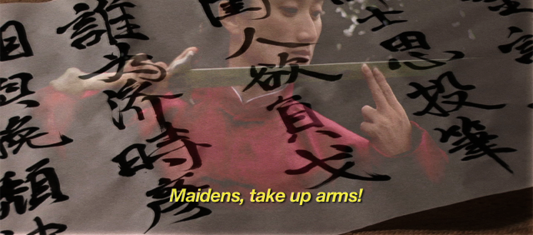
While we finish up the audio mixing with Matt this week, we decided to make a change to the look of our subtitles in Autumn Gem. Up until today, we’ve been using Final Cut’s standard Text generator to create our subtitles. Here’s a screenshot of what our subtitles used to look like:
autumn-gem-subtitles-yellow

This afternoon, I began switching over to using the Outline Text generator. This has a number of benefits, chief among them the ability to add a stroke around each character, which greatly improves readability. In addition, we’ve changed the font style from italic to plain, which reduce jaggies when displaying the film on lower-resolution monitors or on DVD. Here’s what our subtitles look like now:
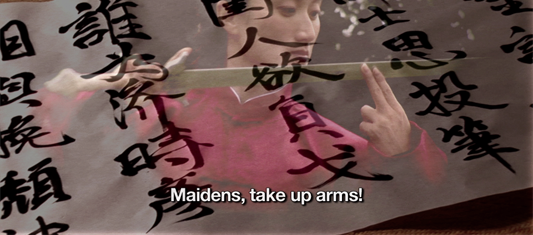
autumn-gem-subtitles-white

I’ve been planning to make this change for many months, but I’ve been procrastinating until now, knowing that it would take me about nine hours to change every text clip in the entire film. Unfortunately, there’s no quick and easy way to batch convert from one text generator to another. I did find some shortcuts that helped speed up the process:

  1. Create an outline text generator with your default settings for font style, size, and stroke width
  2. Place the outline text on your timeline and set the duration to be exactly the length of the text you are replacing
  3. Copy the text clip that you are replacing (Command-C)
  4. Paste Attributes onto the new outline text clip (Option-V)
  5. Double-click on the original text clip
  6. Copy the text under the control tab
  7. Double-click on the new text clip
  8. Paste the new text under the control tab
  9. Repeat with the rest of your text clips

One annoying thing is that the placement controls are different between the two text generators. For instance, setting a center position of (0, 345) for an Outline Text clip does not line up in the same place as setting (0, 345) with a standard Text clip. This means I’ve had to manually position a number of text clips, a time-consuming process that I really don’t want to visit again!

So, the decision to go from straight text to outline text, while simple, requires lots of time, patience, and verification. In the end, though, it’s the right move, as our subtitles are much more readable now than before.

For those type-inclined, we used the classic font Helvetica Neue for main subtitle font. Hoefler Text was used as our serif title font, and ST Kaiti was used when displaying Chinese characters.
White Balance and Color Grading

Standard

During the filming of Autumn Gem, we used Phoxle SpectraSnap White Balance Filter 1 to set a custom white balance for each scene. I’ve used many white balance products in the past, including ExpoDisc, WhiBal, and gray cards, and I’ve found the SpectraSnap to be one of the better products out there. Its ability to fit a wide variety of lenses, including the two Sony videocameras we used to film the documentary, was key. I also appreciated the fact that it is a shoot-through white balance filter; I’ve found the accuracy of those to be higher than reflected light WB filters.

In the film, however, we’re not always looking to have a neutral color tone throughout our scenes. Getting neutral-looking footage, however, makes it easier to color correct — or color grade, as it’s called in the film industry — afterwards. I’ve been using a combination of Final Cut’s Three-Way Color Corrector filter and Apple’s Color application to perform various color grading tasks.

Here are screenshots of a before and after scene from Autumn Gem. The photo on the below is what was recorded by the the camera. As you can see, there is still a slight cast to the photo, even when using the SpectraSnap. I suspect that’s because the lights we used to light the background versus the foreground were different.

The original look of the serving tea scene.

The original look of the serving tea scene.

The next photo is the same scene that was corrected using Color. I set up a number of Secondary Rooms to apply color corrections to only specific parts of the scene such as the walls or Qiu Jin’s outfit.

The serving tea scene that has been color corrected using Apple Color.

The serving tea scene that has been color corrected using Apple Color.

Once we have picture lock on the film, I’ll continue to color grade certain scenes from the film. Not all scenes require such work, and for those, the built-in Three-Way Color Corrector in Final Cut does as admirable job. For more complex scenes, however, Color is a powerful tool for getting the look that we want out of the film.


1 Phoxle is run by Chris Pedersen, a friend of mine whom I know from my Camera Owners of the Bay Area user group meetings.

How Time Flies… and the Third Cut

Standard

Brushes

How time flies! A year ago this time, we were planning our trailer shoot and preparing for our trip to China. The film has been built out in six month increments. Rae started pre-production work around July of last year. We started filming in January, wrapping things up around the middle of June. The past six months have been spent in our home office, slaving away at Final Cut day in, day out.

A little over a month after completing our first rough cut, Rae and I are putting the finishing touches on the third cut of the film. Though the running time difference between the first and third cuts comprise just a few minutes, there’s been some substantial changes in the pacing. It’s amazing how trimming a half a second here and there can improve a scene so much! We’ve also moved some scenes around to improve the narrative structure.

I’ve been spending the past several days color correcting the film, trimming edits, and adjusting the captions and subtitles. Every day, we’re getting closer to completing the film, but there always seems to be more things to be added to the task list! Fortunately, the light at the end of the tunnel is just ahead.

We’ll try to post more frequently to the blog from this point forward. Writing is kinda like brushing and flossing your teeth every night; you just have to get in the habit!

Rough Cut Completed!

Standard

We’ve reached an important milestone with the film today with the completion of the rough cut of The Qiu Jin Project: Autumn Gem!

It took me 22 hours to go from picture lock to burning the first DVD; the long delay was a result of my supreme struggle to get Final Cut to export the movie without crashing. I searched long and hard for a solution on the Creative Cow Final Cut forum, Ken Stone’s site, Google, and on Apple’s own forums. I eventually settled on using the instructions on Ken’s web site using the Export using Quicktime Conversion command in Final Cut to export the HDV timeline to Apple ProRes 422. To get around the “out of memory” errors, I had to break up the export into several pieces.

From there, I brought the video into Compressor, where I could now export a version for DVD and iPhone. That took a number of hours even with an 8-core Mac Pro! After that, I popped the video into DVD Studio Pro and quickly pumped out a DVD.

With the rough cut complete, we can now show the documentary to our crew, potential donors, family, friends, and other interested parties.

Music and Audio Recording

Standard

Rae recording narration for The Qiu Jin Project

The past few weeks, we’ve been recording music and audio for The Qiu Jin Project. Melody Chen and Min Seun Kim have recorded their guzheng and flute pieces respectively for the documentary. Rae went over to Matt’s house in Campbell to record the narration. We’ve been laying these clips on top of our existing audio and video tracks, and everything is turning out great. There are a few more musical pieces that we need to record, including a choir, cello, and piano piece. In addition, there are a couple of foley sound clips just waiting to be created.

Click on this link to view the photos.

Wushu ala Final Cut

Standard

This afternoon, we edited a scene from our filming of the Chinese Women’s Army at Tilden Park in Berkeley. Li Jing, who plays Qiu Jin in the documentary, is running through a hand form.

The timeline from a wushu scene from the film

Nine takes were used to construct this scene. One take was a wide shot which we use to start the sequence. Mixed throughout are eight closeup shots detailing the action as Li Jing goes from one move to the next. Add in a little wind sound, and we’ve got ourselves a nice 34-second clip!

There’s a saying that a film is really created in the editing room. After having spent several months living in Final Cut, Rae and I certainly agree with that statement!