
Rae and I have learned quite a bit about using Final Cut to create our documentary, Autumn Gem. Here are some tips that will save you a lot of time when putting together your film.
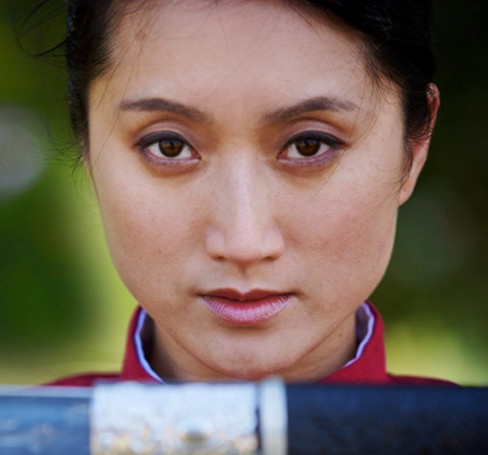
Rae and I have learned quite a bit about using Final Cut to create our documentary, Autumn Gem. Here are some tips that will save you a lot of time when putting together your film.
Last week, we went to Matt’s house to ADR dialogue with our actress, Li Jing. We also submitted our film to be listed on IMDB through our membership with Without A Box. I noticed that there’s another Adam Tow listed in IMDB; that means, I’ll be Adam Tow (II) once my listing is created.
Here are some photos from our ADR recording sessions.
Check out the Autumn Gem listing on IMDB!
Lately, the numbers 0.82, 0.84, 0.88, 1.0, 1.24, 1.3, and 1.4 have been foremost on my mind. These are the gamma correction values that I find myself frequently applying to video clips coming into and out of Apple’s Final Cut Pro, Color, Compressor and DVD Studio Pro software. Although I’ve read numerous articles on the handling of gamma on Mac OS X, I don’t find myself anywhere closer to understanding the whole picture.

Exports from Final Cut using QuickTime Conversion and the ProRes 422 codec look great on my Mac in QuickTime Player. The same sequence exported using QuickTime Movie looks washed out in QuickTime Player unless I have the Enable Final Cut Studio Color Compatibility preference enabled. When I export the film using Compressor, I have to enter at least 1.24 in the Gamma Correction filter. This is done so the colors on the DVD, burned using DVD Studio Pro, don’t look washed out.

This has got to be a common problem for filmmakers using Apple’s professional products. Trial and error seems to be what most people do to get something acceptable across all broadcast medium.
When the final cut of Autumn Gem is complete next month, I’m sure I’m going to revisit this problem again when we transfer the movie to HDCAM and other festival screening formats.
Well, it’s finally time to make it official! We’re transitioning away from our working title The Qiu Jin Project in favor of Autumn Gem as the official name of the project. The domain names have been purchased, email has been set up, and the redirects are now working.
You can still reach the website by typing in http://qiu-jin.com, but you will now be magically redirected to http://autumn-gem.com.
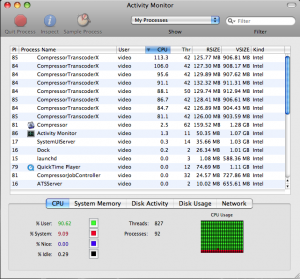
Here’s a screenshot from the Mac OS X Activity Monitor showing all eight cores on our Mac Pro working hard to encode Autumn Gem into a DVD. Our documentary is about 60 minutes long, and it takes roughly two hours to perform a 2-pass MPEG-2 encode.
As of today, we’ve created five different cuts of the film, each one leaner and more representative of the final cut. We’ll soon be calling picture lock on the film, which means no more edits. At that point, the audio will be sent for final mixing and I’ll complete my color grading. We still need to ADR a few scenes, which we plan to record over the next few weeks.
Then, we’ll move onto the next phase, which is figuring out how (and how much it will cost) to get the documentary transferred onto a format suitable for exhibition. Last night, we watched the latest cut on our HDTV, with video piped in from my MacBook Pro. The footage looked fantastic, and I really hope that we can get the picture to look like this on DVD and on HDCAM and DigiBeta (the preferred film festival exhibition formats these days). With the last few DVDs that we’ve produced, I’ve noticed that the colors are more washed out when compared to the Final Cut version. As a result, I’m experimenting with different settings in Compressor, raising the bitrate and dialing in some gamma correction. Eventually, the right combination of settings will come to me!
I’m pretty happy that we’ve been able to stay close to our original project schedule. Six months of pre-production, six months of production, and another six months of post-production. Next year, we’ll be shifting our focus more towards marketing, business development, and screenings. We can’t wait to start screening the film to the general public!
The past few days, Rae and I have been preparing the film to submit to a number of film festivals in California and Oregon. We’ve been furiously finishing up cut number four, along with writing applications, burning DVDs and assembling press kits. On Friday, we drove up to Stanford and San Francisco to drop or mail our submissions. Now, it’s out of our hands and up to the festival screeners to see if the documentary is worthy!
During the filming of Autumn Gem, we used Phoxle SpectraSnap White Balance Filter 1 to set a custom white balance for each scene. I’ve used many white balance products in the past, including ExpoDisc, WhiBal, and gray cards, and I’ve found the SpectraSnap to be one of the better products out there. Its ability to fit a wide variety of lenses, including the two Sony videocameras we used to film the documentary, was key. I also appreciated the fact that it is a shoot-through white balance filter; I’ve found the accuracy of those to be higher than reflected light WB filters.
In the film, however, we’re not always looking to have a neutral color tone throughout our scenes. Getting neutral-looking footage, however, makes it easier to color correct — or color grade, as it’s called in the film industry — afterwards. I’ve been using a combination of Final Cut’s Three-Way Color Corrector filter and Apple’s Color application to perform various color grading tasks.
Here are screenshots of a before and after scene from Autumn Gem. The photo on the below is what was recorded by the the camera. As you can see, there is still a slight cast to the photo, even when using the SpectraSnap. I suspect that’s because the lights we used to light the background versus the foreground were different.

The original look of the serving tea scene.
The next photo is the same scene that was corrected using Color. I set up a number of Secondary Rooms to apply color corrections to only specific parts of the scene such as the walls or Qiu Jin’s outfit.

The serving tea scene that has been color corrected using Apple Color.
Once we have picture lock on the film, I’ll continue to color grade certain scenes from the film. Not all scenes require such work, and for those, the built-in Three-Way Color Corrector in Final Cut does as admirable job. For more complex scenes, however, Color is a powerful tool for getting the look that we want out of the film.
1 Phoxle is run by Chris Pedersen, a friend of mine whom I know from my Camera Owners of the Bay Area user group meetings.

How time flies! A year ago this time, we were planning our trailer shoot and preparing for our trip to China. The film has been built out in six month increments. Rae started pre-production work around July of last year. We started filming in January, wrapping things up around the middle of June. The past six months have been spent in our home office, slaving away at Final Cut day in, day out.
A little over a month after completing our first rough cut, Rae and I are putting the finishing touches on the third cut of the film. Though the running time difference between the first and third cuts comprise just a few minutes, there’s been some substantial changes in the pacing. It’s amazing how trimming a half a second here and there can improve a scene so much! We’ve also moved some scenes around to improve the narrative structure.
I’ve been spending the past several days color correcting the film, trimming edits, and adjusting the captions and subtitles. Every day, we’re getting closer to completing the film, but there always seems to be more things to be added to the task list! Fortunately, the light at the end of the tunnel is just ahead.
We’ll try to post more frequently to the blog from this point forward. Writing is kinda like brushing and flossing your teeth every night; you just have to get in the habit!
We’ve reached an important milestone with the film today with the completion of the rough cut of The Qiu Jin Project: Autumn Gem!
It took me 22 hours to go from picture lock to burning the first DVD; the long delay was a result of my supreme struggle to get Final Cut to export the movie without crashing. I searched long and hard for a solution on the Creative Cow Final Cut forum, Ken Stone’s site, Google, and on Apple’s own forums. I eventually settled on using the instructions on Ken’s web site using the Export using Quicktime Conversion command in Final Cut to export the HDV timeline to Apple ProRes 422. To get around the “out of memory” errors, I had to break up the export into several pieces.
From there, I brought the video into Compressor, where I could now export a version for DVD and iPhone. That took a number of hours even with an 8-core Mac Pro! After that, I popped the video into DVD Studio Pro and quickly pumped out a DVD.
With the rough cut complete, we can now show the documentary to our crew, potential donors, family, friends, and other interested parties.

At the age of four or five, a young Chinese girl growing up during the 10th and early 20th centuries would begin the process of foot binding. Her feet would be broken and bound into tight bandages for the next ten to fifteen years. The goal was to achieve the desired size of the three-inch golden lotuses. Foot binding caused constant, excruciating pain. In the beginning, a girl could barely even stand on her own. Walking even a few steps would often be painful and tiring.
Qiu Jin was considered one of the more fortunate victims. Despite the pain, she continue to remain active throughout her life.
Rae and I are getting closer to completing the rough cut of The Qiu Jin Project. It’s been a long process, but the light at the end of the tunnel is clearly visible now. Of course, there’s a lot of work still to be done even after we get the rough cut done. For instance, we have to complete our musical score and perform color grading. Still, having the rough cut is a significant goal that we set out to achieve this month!
 Autumn Gem